One directory: who, where, and what they drive.
Most parking problems start as an identification problem. Somebody is in a space, you have a plate, and finding out whose it is takes four screens and a phone call. Here it takes the plate.

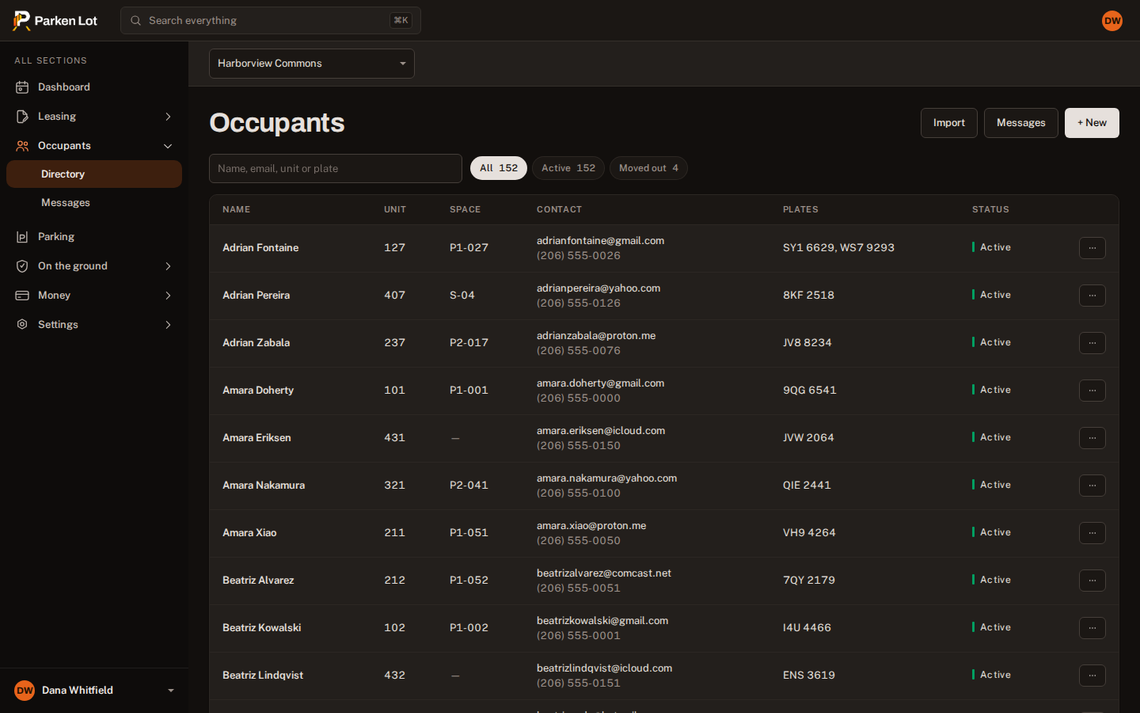
Searchable by what you actually have
A name, a unit, an email or a plate all find the same household. Every vehicle on the account is listed, with the state it is registered in.
- Moved out stays visible as history rather than disappearing with the space.
- Statuses that mean something — invited, waiting on a signature, waiting on payment, active, suspended.
- Notes for the things a manager needs to remember and nobody else needs to see.
Bring the list you already keep
Import a CSV, read a row-by-row preview of exactly what will be created, then create that. Existing residents are never silently changed.
- A preview you can refuse, not an import you have to undo.
- Invitations in bulk, each carrying the contract to sign.
- Several properties on one screen, or one at a time.
Questions about occupants and vehicles.
What if two households share a space?
A space can be held by one household at a time; tandem spaces are their own type for the case where two cars genuinely share one bay.
Do residents maintain their own vehicles?
Yes, from their own screen, which is the only way a vehicle list stays current. You can edit them too.
The rest of it.
Digital permits
A permit on a phone, checked from a plate or a code in about three seconds.
How it worksGuest passes
Residents request, you approve or decline, and the pass prices itself by the day, week or month.
How it worksEnforcement
Warnings, citations and disputes, with a photograph and a grace period stamped at the moment of observation.
How it worksOne plan, per space, per month.
Everything on this page is included. Describe your lot and see the number for your own building.